Thumbwise vs WorkBeaver: Autopilot For Your Work
Una comparación detallada para ayudarte a elegir la herramienta de IA adecuada para tu flujo de trabajo.
Thumbwise
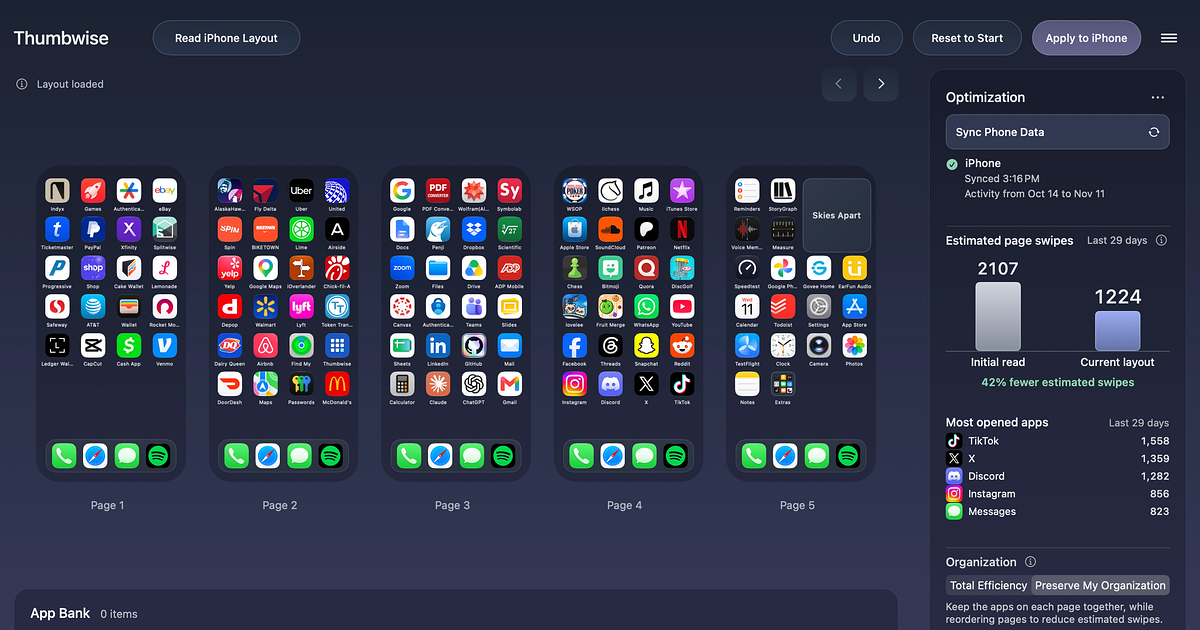
Thumbwise is a Mac app for organizing the Home Screen of an iPhone. You arrange apps, folders, and widgets on a large screen, then apply the exact layout to your iPhone over a USB data cable. It can also build a layout that reduces swipes between Home Screen pages, based on app usage from the past 30 days, or let a compatible AI assistant arrange the apps through Thumbwise's MCP tools. It is for iPhone users with many apps and pages who find rearranging icons on the device slow. It requires a Mac with Apple silicon running macOS 15 or later and an iPhone on iOS 27. iPad is not supported. Thumbwise keeps your layout on your Mac and does not install an app or profile on the iPhone. It backs up your current layout before every Apply and lets you restore an earlier one. Downloading, organizing, and previewing are free. A one-time payment of $14.99 USD unlocks Apply.
Ver Thumbwise →
WorkBeaver: Autopilot For Your Work
WorkBeaver is an AI automation sidekick designed to eliminate repetitive clicks and tasks, allowing users to automate virtually any browser work. Users simply describe the desired task, review the steps, and let the platform execute the work, whether immediately or on a schedule. It is designed for non-technical teams and real people, working even if the user cannot code. Automation use cases include monitoring websites for updates, sorting emails and extracting leads, collecting product details into structured data, and keeping spreadsheets up to date. The tool focuses on ease of use and security, offering browser extension access and local AI support for privacy. Users can start with a free starter tier and choose between monthly subscriptions or a one-time purchase for lifetime access.
Ver WorkBeaver: Autopilot For Your Work →Comparación de funciones
Thumbwise
Aún no hay funciones.
WorkBeaver: Autopilot For Your Work
- •Browser extension access
- •Local AI support for privacy
- •Schedule recurring work
- •Handle forms and portals
- •Collect data from websites
De un vistazo
| Thumbwise | WorkBeaver: Autopilot For Your Work | |
|---|---|---|
| Categoría | Productivity | Productivity |
| Precios | Freemium | Freemium |
| Valoración de la Comunidad | Sin reseñas | Sin reseñas |
| Votos en Stremit | 0 | 196 |
| Sitio web | thumbwise.app ↗ | workbeaver.com?aff=pifxio ↗ |
Thumbwise vs WorkBeaver: Autopilot For Your Work: ¿cuál es mejor?
Elegir entre Thumbwise y WorkBeaver: Autopilot For Your Work depende de tus necesidades concretas. Las dos herramientas pertenecen a la categoría Productivity , así que son competidoras directas. Compara arriba sus precios, funciones y reseñas para tomar la mejor decisión para tu flujo de trabajo.
Visita la página de cada herramienta para ver información más detallada, reseñas de la comunidad y el desglose de funciones.
Preguntas frecuentes
What is the difference between Thumbwise and WorkBeaver: Autopilot For Your Work?
Thumbwise: Thumbwise is a Mac app for organizing the Home Screen of an iPhone. You arrange apps, folders, and widgets on a large screen, then apply the exact layout to your iPhone over a USB data cable. It can also build a layout… WorkBeaver: Autopilot For Your Work: WorkBeaver is an AI automation sidekick designed to eliminate repetitive clicks and tasks, allowing users to automate virtually any browser work. Users simply describe the desired task, review the steps, and let the…
Is Thumbwise free?
Thumbwise is listed as Freemium on Stremit. Check the tool's site for current plans.
Is WorkBeaver: Autopilot For Your Work free?
WorkBeaver: Autopilot For Your Work is listed as Freemium on Stremit. Check the tool's site for current plans.
Are Thumbwise and WorkBeaver: Autopilot For Your Work competitors?
Yes — both are Productivity tools on Stremit, so people often compare them before choosing.