Raccoon AI: Collaborative AI for Anything vs Offline AI File Renamer & Organizer for Mac & Windows
Une comparaison détaillée pour vous aider à choisir le bon outil IA pour votre workflow.

Raccoon AI: Collaborative AI for Anything
Raccoon AI is a collaborative AI agent that builds apps, documents, presentations, dashboards, and designs from a plain-language description. It runs on its own cloud computer, lays the work out as a live checklist, and shows each reasoning step, search, and action as it happens. Users can steer the agent mid-task, rewind to earlier steps, or fork a new path. It is aimed at people who want finished work from a single description, such as a launch page, a dashboard built from a spreadsheet, or a research brief with sources. Users can connect Gmail, Drive, Calendar, GitHub, and 50+ connectors, so the agent works inside their own accounts. What sets it apart is persistence and control. Files, data, and running servers stay in place between sessions, and the agent remembers users from one session to the next. Finished work can be published to a live link or deployed to your own domain in one click.
Voir Raccoon AI: Collaborative AI for Anything →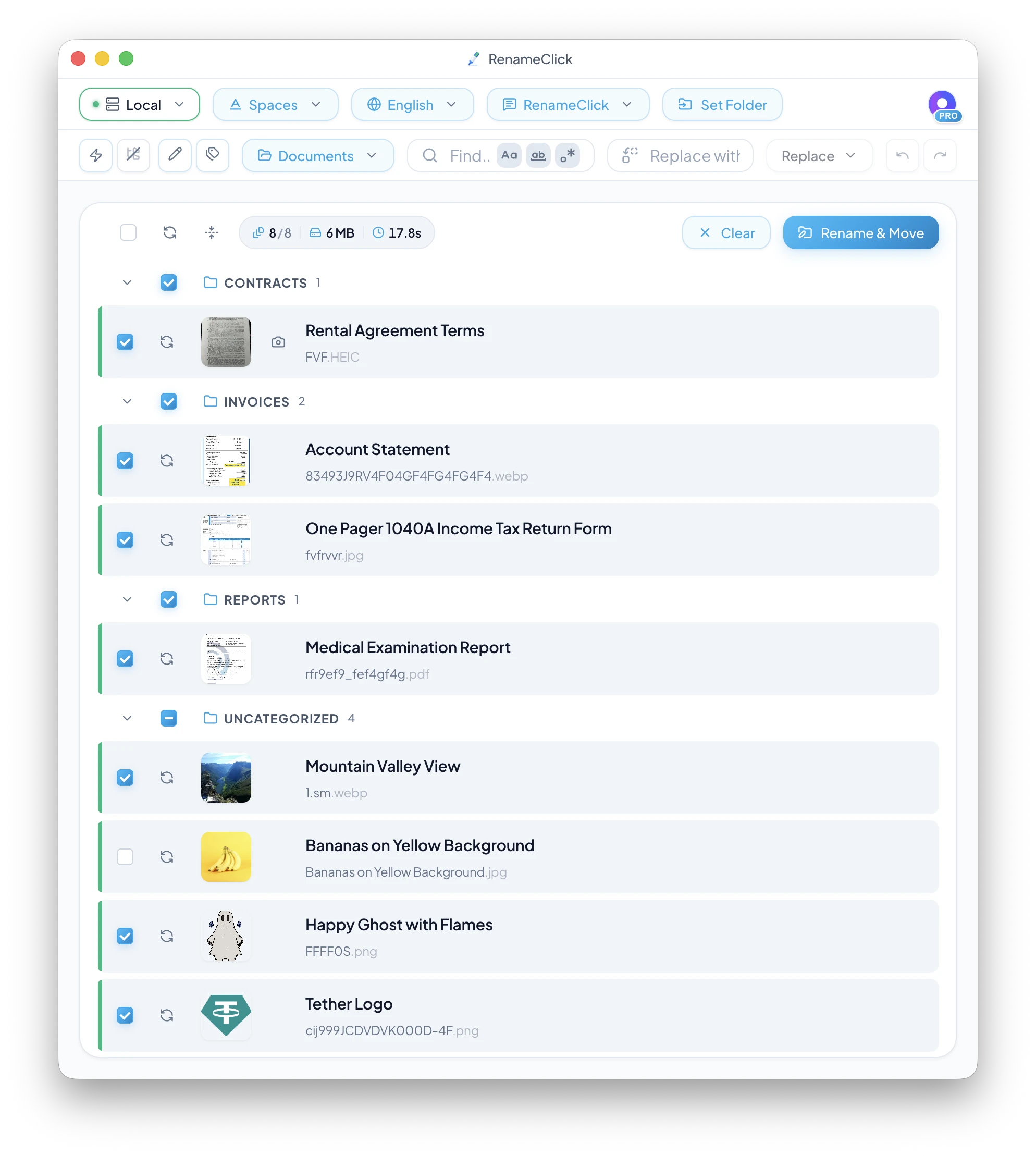
Offline AI File Renamer & Organizer for Mac & Windows
RenameClick is a desktop app for Mac and Windows that renames and sorts files by what they contain. It reads supported documents, images and videos, and with Audio Transcription installed it names recordings from the speech in them. Each suggested name and folder can be checked before it is applied. It can also index a folder and find a document or image by description. It suits people with messy folders of PDFs, scans, photos or recordings who want consistent names and folders. Auto Flow can watch folders while the app runs and handle new downloads. With Local AI, files are read on the computer. The built-in model works offline after a one-time download and has no API costs. Users can also connect a local server such as Ollama or LM Studio, or add their own cloud API key, which sends content to that service. The free plan includes 100 applied renames or moves per month.
Voir Offline AI File Renamer & Organizer for Mac & Windows →Comparaison des fonctionnalités
Raccoon AI: Collaborative AI for Anything
- •Build apps, slides, dashboards, and designs from plain-language descriptions
- •Live checklist plan you can view and steer during a task
- •Connects Gmail, Drive, Calendar, GitHub, and 50+ connectors
- •Research with citations and helper agents for parallel work
- •Rewind to any step or fork a new path
- •Publish to a live link or your own domain in one click
Offline AI File Renamer & Organizer for Mac & Windows
- •Renames files based on their content, including PDFs, images and videos
- •Audio transcription names recordings from what is said
- •Separate settings for renaming and sorting into folders
- •Auto Flow watches folders and handles new incoming files
- •Indexed folder search to find and rename documents by description
- •Local AI runs on the computer and works offline after a one-time model download
En bref
| Raccoon AI: Collaborative AI for Anything | Offline AI File Renamer & Organizer for Mac & Windows | |
|---|---|---|
| Catégorie | Productivity | Productivity |
| Prix | — | Freemium |
| Note de la communauté | Aucun avis | Aucun avis |
| Votes positifs sur Stremit | 70 | 87 |
| Site web | raccoonai.tech ↗ | rename.click ↗ |
Raccoon AI: Collaborative AI for Anything vs Offline AI File Renamer & Organizer for Mac & Windows : lequel est le meilleur ?
Choisir entre Raccoon AI: Collaborative AI for Anything et Offline AI File Renamer & Organizer for Mac & Windows dépend de vos besoins précis. Les deux outils appartiennent à la catégorie Productivity , ce qui en fait des concurrents directs. Comparez leurs prix, fonctionnalités et avis ci-dessus pour faire le meilleur choix pour votre workflow.
Consultez la page de chaque outil pour des informations plus détaillées, les avis de la communauté et le détail des fonctionnalités.
Questions fréquentes
What is the difference between Raccoon AI: Collaborative AI for Anything and Offline AI File Renamer & Organizer for Mac & Windows?
Raccoon AI: Collaborative AI for Anything: Raccoon AI is a collaborative AI agent that builds apps, documents, presentations, dashboards, and designs from a plain-language description. It runs on its own cloud computer, lays the work out as a live checklist, and… Offline AI File Renamer & Organizer for Mac & Windows: RenameClick is a desktop app for Mac and Windows that renames and sorts files by what they contain. It reads supported documents, images and videos, and with Audio Transcription installed it names recordings from the…
Is Offline AI File Renamer & Organizer for Mac & Windows free?
Offline AI File Renamer & Organizer for Mac & Windows is listed as Freemium on Stremit. Check the tool's site for current plans.
Are Raccoon AI: Collaborative AI for Anything and Offline AI File Renamer & Organizer for Mac & Windows competitors?
Yes — both are Productivity tools on Stremit, so people often compare them before choosing.