Opal vs AI Note Taker: Audio Transcription, Meeting Notes, PDF Summary
A detailed comparison to help you choose the right AI tool for your workflow.
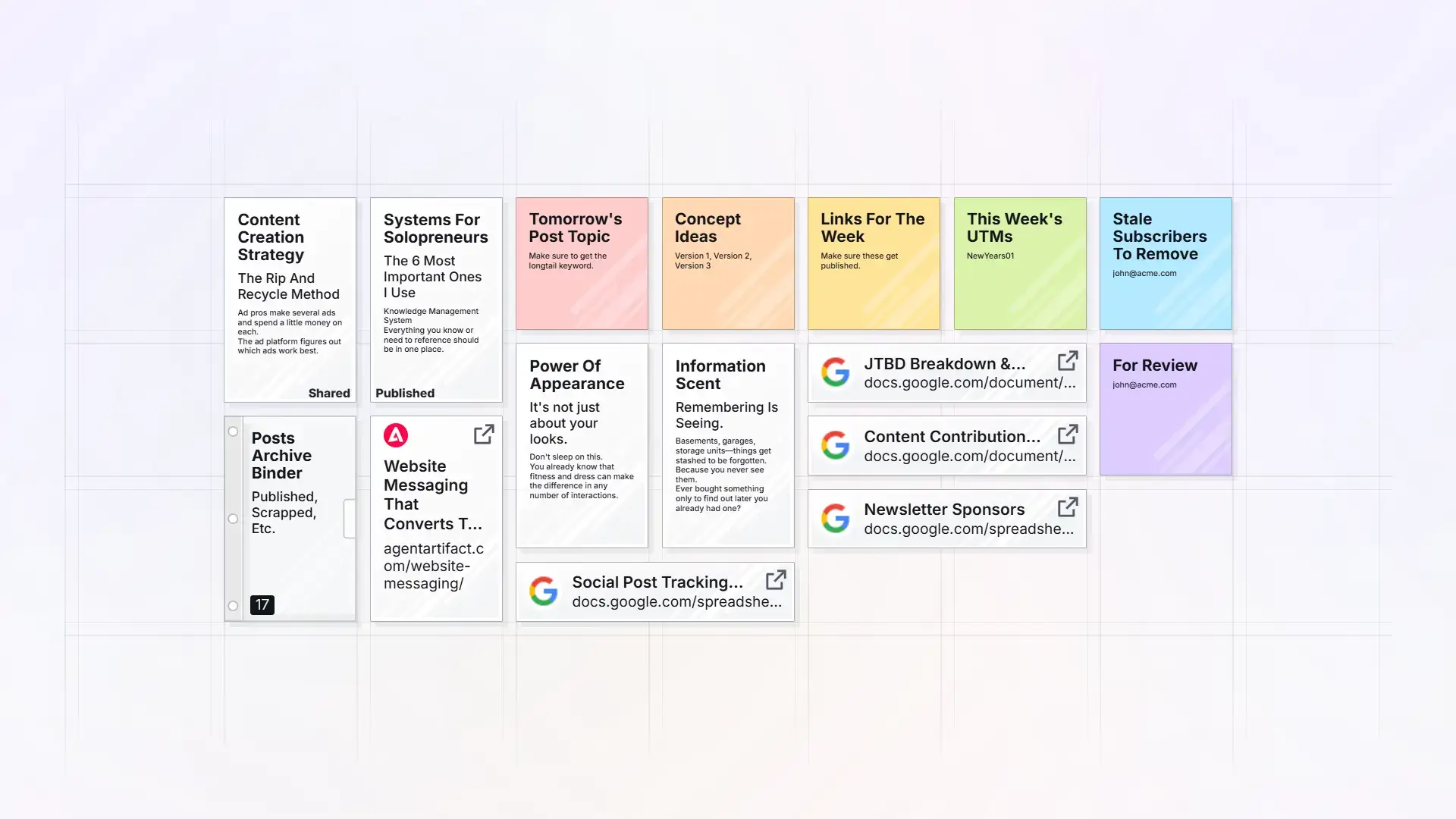
Opal
Opal Recall is a spatial note taking app. Users create or drag notes, docs, links, binders, files, and Google Docs and Sheets onto large, pannable digital desks. Items are placed on a visual grid, so users can find them by where they were put rather than by typing into a search box. It is built for freelancers, solopreneurs, and small teams who want to see all of a project's material at once. The site describes its setup as simple, with no onboarding wizard and no folder to choose when adding an item. The main difference from folder- and page-based tools is that the desk is the organizing structure. Users can open several items side by side in one tab, and each workspace gets its own URL. Access is currently by invitation in batches, and users register to reserve a spot.
View Opal →
AI Note Taker: Audio Transcription, Meeting Notes, PDF Summary
HyNote is an AI note taker that records or imports audio, meetings, PDFs, YouTube links, web pages, and images. It transcribes the content and produces summaries, key points, action items, and meeting minutes. It transcribes Zoom, Google Meet, Teams, and Webex without a meeting bot, either live or from a recording. The tool is aimed at professionals on teams and at students. Users can choose from 30+ templates, including SWOT, interviews, study notes, and follow-ups. Notes export to PDF, TXT, Google Docs, or Notion, and sync across web, iPhone, Android, iPad, Apple Watch, and Chrome. The site describes its summaries as abstractive, meaning they are generated from full transcripts or documents rather than extracted as bullet points. It states AES-256 encryption at rest, TLS 1.2+ in transit, and alignment with GDPR and CCPA. HyNote also states that it never uses customer content to train its models.
View AI Note Taker: Audio Transcription, Meeting Notes, PDF Summary →Feature Comparison
Opal
- •Large, pannable digital desk for placing items on a grid
- •Drag-and-drop notes, docs, links, binders, and files
- •Google Docs and Google Sheets support
- •Open multiple items side by side in one tab
- •Find items by location without typing a search
- •Unique workspace URL for each user
AI Note Taker: Audio Transcription, Meeting Notes, PDF Summary
- •Transcribes Zoom, Google Meet, Teams, and Webex without a bot
- •Eight input types, including audio, PDFs, images, and YouTube links
- •Abstractive summaries with action items and meeting minutes
- •30+ templates such as SWOT, interviews, and study notes
- •Export to PDF, TXT, Google Docs, or Notion
- •AES-256 encryption at rest and TLS 1.2+ in transit
At a glance
| Opal | AI Note Taker: Audio Transcription, Meeting Notes, PDF Summary | |
|---|---|---|
| Category | Productivity | Productivity |
| Pricing | — | — |
| Community Rating | No reviews | No reviews |
| Upvotes on Stremit | 47 | 56 |
| Website | opalrecall.com ↗ | hynote.ai ↗ |
Opal vs AI Note Taker: Audio Transcription, Meeting Notes, PDF Summary: Which is Better?
Choosing between Opal and AI Note Taker: Audio Transcription, Meeting Notes, PDF Summary depends on your specific needs. Both tools belong to the Productivity category, making them direct competitors. Compare their pricing, features, and user reviews above to make the best choice for your workflow.
Visit the individual tool pages for more detailed information, community reviews, and feature breakdowns.
Frequently asked questions
What is the difference between Opal and AI Note Taker: Audio Transcription, Meeting Notes, PDF Summary?
Opal: Opal Recall is a spatial note taking app. Users create or drag notes, docs, links, binders, files, and Google Docs and Sheets onto large, pannable digital desks. Items are placed on a visual grid, so users can find them… AI Note Taker: Audio Transcription, Meeting Notes, PDF Summary: HyNote is an AI note taker that records or imports audio, meetings, PDFs, YouTube links, web pages, and images. It transcribes the content and produces summaries, key points, action items, and meeting minutes. It…
Are Opal and AI Note Taker: Audio Transcription, Meeting Notes, PDF Summary competitors?
Yes — both are Productivity tools on Stremit, so people often compare them before choosing.